



Analytics API
Most analytics integrations start the same way. A product team needs data inside their application. Someone embeds a dashboard via iFrame. It ships. It works, mostly. Users can see charts without leaving the product.
Then the first customization request comes in. A customer wants the dashboard to match their brand exactly. Another needs filters that respond to what the user is currently doing in the application. Someone asks whether users can ask questions in natural language instead of navigating reports. And the engineering team starts to realize the iFrame was a workaround, not a foundation.
An analytics API is what sits underneath a properly built embedded analytics experience. It’s what enables analytics to behave like a native part of your product — responding to application context, respecting user permissions, serving AI-generated insights, and scaling across thousands of tenants without becoming a maintenance burden.
This guide explains what analytics APIs are, how they work, and what changes when you build on them instead of around them.
What Is an Analytics API?
An analytics API is a set of endpoints and protocols that allow applications to access, embed, and interact with analytics capabilities programmatically. Instead of directing users to an external dashboard tool, the application makes API calls to retrieve data, load visualizations, apply filters, and return insights — all within the product interface.
An analytics API makes analytics a function your application calls — not a destination your users navigate to.
For product and engineering teams, this shift has concrete implications. Analytics that runs through an API can be triggered by user actions, scoped to a specific context, filtered by the current user’s permissions, and connected to AI systems — all without requiring the user to do anything except continue using your product.
The contrast with traditional embedded dashboards is architectural, not cosmetic. An iFrame loads an external tool’s UI inside your product. An analytics API integrates analytics into your application’s logic — which means you control the interface, the data access model, and the behavior, not the analytics vendor.
How Analytics APIs Work
An analytics API receives a request from your application, processes it through an analytics engine, and returns a structured result. The request can be as simple as “give me this metric for this user” or as complex as “run this query against this dataset, apply these filters, and return the result as a chart component.”
The request flow
At a functional level, every analytics API interaction follows the same pattern:
- Your application sends a request — a query, a dashboard load instruction, a filter parameter, or a natural language question
- The API processes the request — authenticating the user, enforcing data access rules, executing the query
- The analytics engine retrieves the data — from your connected databases, warehouses, or APIs
- The result is returned to your application — as structured data, a rendered component, or an AI-generated insight
- Your application renders the output — using your own UI components or the analytics SDK
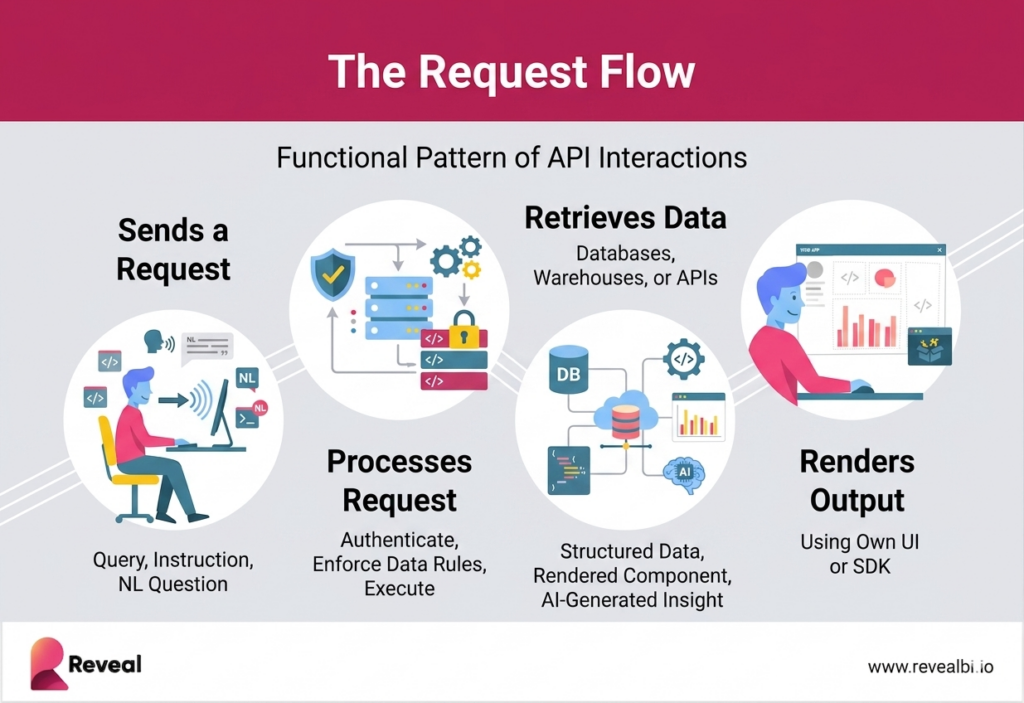
What makes this different from a static dashboard embed is that every step is governed by your application’s context. The user’s identity, their role, their tenant, their current workflow state — all of it is passed through the API and shapes what gets returned. Analytics becomes responsive to the product, not just available alongside it.
Core API capabilities
- Data query endpoints — retrieve raw or aggregated data based on metrics and dimensions
- Dashboard and visualization endpoints — load or generate charts dynamically inside the application
- Filtering and drill-down — apply user context, parameters, and interactions programmatically
- Authentication and access control — enforce permissions before any data is returned
- Real-time and cached data handling — support live queries or optimized responses for performance
- AI and conversational endpoints — translate natural language into queries and return structured insights
Analytics API vs Traditional BI Tools
Traditional BI tools are designed for data teams and analysts to explore data through dashboards and reports. An analytics API shifts that model to one where embedded analytics runs within the application — requested, processed, and delivered as part of the product experience rather than as a separate destination.
The practical gap shows up when a product team tries to do something traditional BI wasn’t designed for: responding to real-time user context, enforcing tenant-level data isolation at the query level, integrating with AI systems, or building an experience that looks and behaves like it was built by the product team’s own engineers.
| Traditional BI | Analytics API | Why It Matters | |
|---|---|---|---|
| Access model | External dashboards | Embedded in-app | Users never leave your product to find data |
| Interaction | Manual exploration | Programmatic access | Analytics can be triggered by workflows, not just users |
| UI control | Fixed, tool-defined | Fully customizable | Matches your product’s design system exactly |
| Integration | iFrame or bolt-on | Native SDK + API | No ceiling on customization or interaction depth |
| Data delivery | Pre-built reports | On-demand queries | Real-time results based on current user context |
| Automation | Limited | API-driven | Powers alerts, triggers, and AI-driven actions |
The most important row in that table is the last one. Traditional BI tools were not designed for AI consumption, they were designed for human analysts. An analytics API, by contrast, is structured for programmatic access, which means AI systems can query it, interpret results, and generate insights through the same layer that powers the rest of the analytics experience. That’s the architecture that makes conversational analytics possible.
Types of Analytics APIs
Analytics APIs are not a single interface. A complete analytics layer includes several API types that each handle a specific part of the experience — from data retrieval to visualization to AI interaction. Understanding which type does what matters when you’re evaluating platforms or designing your own analytics architecture.

1. Data Query APIs
Data query APIs retrieve raw or aggregated data based on defined metrics and dimensions. They’re the foundation, every other analytics API type ultimately depends on data query APIs to get what it needs.
- Power backend analytics logic and custom queries across datasets
- Apply aggregations, grouping, filters, and sorting programmatically
- Return structured data that visualization or AI layers can consume
When to use them: anytime your application needs to retrieve data for any purpose — charts, tables, dashboards, AI-generated summaries, or automated reporting pipelines.
2. Visualization APIs
Visualization APIs control how data is presented inside your application. They render charts, dashboards, and visual components based on API responses and your application’s configuration.
- Generate charts and dashboards dynamically from data query results
- Control layout, formatting, and display logic through your application code
- Connect data outputs to frontend components in your design system
When to use them: when you need the analytics rendering layer to be driven by your application’s logic — user role, current context, tenant configuration — not hardcoded in a dashboard template.
3. Embedded Analytics APIs
Embedded analytics APIs deliver the complete analytics experience inside your product — not just data retrieval or visualization, but the full in-product analytics layer. They combine data access, rendering, white-label control, multi-tenancy, and security into a unified interface.
- Power fully branded in-product analytics experiences
- Enforce multi-tenant data isolation at the query level
- Support white-label deployment across colors, fonts, and UI behavior
- Maintain consistent logic between data access, business rules, and presentation
When to use them: when analytics is a core product feature that needs to look and behave like it was built by your own team.
4. Conversational Analytics APIs
Conversational analytics APIs are where the architecture gets genuinely new. They translate natural language input into structured queries, execute those queries against your data, and return results as text, metrics, or visual output — enabling users to interact with analytics through conversation rather than navigation.
- Convert natural language questions into data queries
- Return KPI summaries, contextual explanations, and visual outputs
- Support follow-up questions and iterative analysis
- Enable chat-based analytics experiences inside your product
This is covered in depth in the next section, because the governance and cost control dimensions of conversational APIs are often overlooked, and they matter significantly for production deployments.
What Is a Conversational Analytics API, and What Does Governance Actually Mean?
A conversational analytics API allows users or AI systems to interact with data through natural language. A user asks a question. The API translates it into a structured query. The query executes against your data infrastructure. The result comes back as text, a chart, a summary, or a recommendation — inside your product, without any dashboard navigation required.
The shift: analytics becomes accessible through conversation, not navigation. Users don’t need to know what dashboard to look at. They ask what they want to know.
The basic flow is straightforward. What’s less straightforward — and what most descriptions of conversational analytics skip — is what has to be true for this to work safely in a multi-tenant SaaS product.
The governance problem most vendors don’t address
When AI generates queries dynamically, based on natural language input from users you don’t control, three risks emerge that didn’t exist with static dashboards:
- Data leakage across tenants. If the AI layer isn’t scoped to the user’s tenant context before executing a query, a user from Company A could potentially receive data that belongs to Company B. This isn’t hypothetical — it’s a failure mode that has occurred in production AI deployments.
- Uncontrolled token costs. LLM-powered conversational analytics can generate significant, unpredictable API costs if token usage isn’t governed. A user asking complex, multi-step questions can generate orders of magnitude more LLM calls than a standard dashboard load. Without controls, this shows up as a surprise invoice.
- Responses that contradict your data governance policies. An AI model operating outside your semantic layer can generate answers that are technically coherent but factually wrong — summarizing metrics that don’t exist, combining dimensions that shouldn’t be combined, or presenting results that conflict with how your product defines key terms.
A production-ready conversational analytics API addresses all three of these:
- Tenant scoping is enforced before execution, not after. Every query generated by the AI layer carries the user’s tenant context as a non-optional parameter.
- Token usage is controlled and predictable. Cost exposure is bounded at the platform level, not left to vary with user behavior.
- AI operates within the semantic layer. Metric definitions, approved dimensions, and governance rules are baked into what the AI can query — not bypassed by natural language input.
The difference between a conversational analytics demo and a conversational analytics deployment is whether these controls exist. Platforms that bolt AI onto an existing analytics layer typically address governance as an afterthought. Platforms built API-first, where AI is one consumer of the same governed data layer, handle governance structurally.
Key Components of an Analytics API Architecture
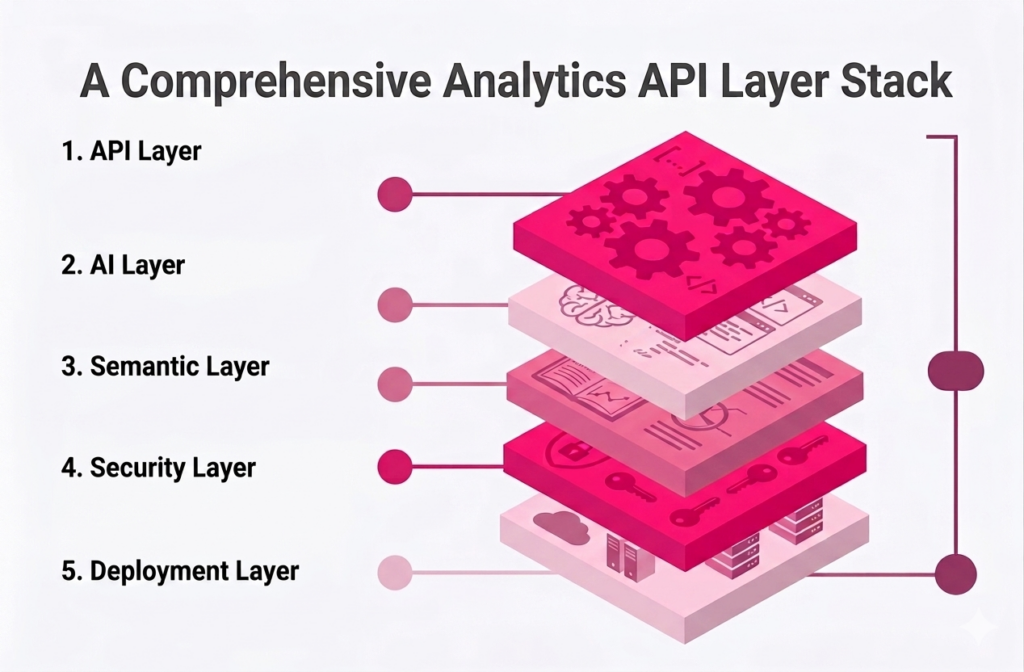
An analytics API doesn’t operate in isolation. It sits on top of a layered architecture where each component handles a specific responsibility. Understanding the layers matters when you’re evaluating platforms — because a gap in any layer becomes a problem in production.
API Layer
The API layer exposes the endpoints your application calls — for queries, dashboards, filters, and AI interactions. It’s the interface between your product and everything underneath it. A well-designed API layer abstracts the complexity of the underlying data infrastructure so your application code stays clean and consistent across use cases.
Semantic Layer
The semantic layer defines what metrics and dimensions mean — and enforces those definitions consistently across every query. Without it, “revenue” in one dashboard can mean something different from “revenue” in another, because different queries hit different tables with different logic. The semantic layer prevents that. It’s the single source of truth for business logic, and it’s what makes AI-generated queries trustworthy — because the AI can only work with definitions the semantic layer approves.
AI Layer
The AI layer translates natural language input into structured queries that the API layer can execute. In a well-architected system, the AI layer doesn’t bypass the semantic layer — it operates on top of it. This is what makes conversational analytics governable: AI can only ask questions using the metrics and dimensions the semantic layer defines, scoped to the data the user is permitted to access.
Security Layer
The security layer controls who can access what data, enforced at the query level rather than the UI level. This includes token or OAuth-based authentication, role-based access control, and tenant-level data isolation. The critical distinction: security that’s enforced at the UI layer (showing or hiding elements) can be circumvented. Security enforced at the query layer cannot be — no query returns data the user isn’t permitted to see.
See Reveal’s security architecture
Deployment Layer
The deployment layer determines where and how the analytics runs — cloud, hybrid, or on-premises. For SaaS companies in regulated industries, or those with enterprise customers who have data residency requirements, deployment flexibility isn’t a feature request — it’s a contract requirement. An analytics API architecture that supports only cloud deployment is a disqualifier for a meaningful portion of the enterprise market.
Analytics API Use Cases in SaaS Products
The abstract benefit of analytics APIs — analytics as part of the product, not beside it — becomes concrete when you look at the specific things they enable that traditional BI approaches can’t.
Customer-facing product analytics
SaaS teams use analytics APIs to embed dashboards, metrics, and self-service exploration directly into their applications. Every customer sees their own data, in real time, without leaving the product — and without the engineering team building a custom analytics layer from scratch. The API handles data access, the SDK handles rendering, and the product team controls the experience.
Multi-tenant analytics at scale
Analytics APIs enable secure data isolation across hundreds or thousands of customers on a shared platform. Each API call carries the tenant context that scopes what data gets returned — which means adding a new customer doesn’t require spinning up a new environment, just provisioning them within the existing architecture. This is the difference between analytics that scales with your business and analytics that requires infrastructure work every time you sign a new enterprise contract.
AI-driven in-product insights
When analytics runs through an API layer that AI systems can access programmatically, conversational analytics becomes possible. Users ask questions, AI generates queries against the governed data layer, and results come back as answers — inside the product, scoped to the user’s tenant and role. This is the architecture that powers natural language query, automated insight surfacing, and AI-generated summaries without requiring a separate AI tool alongside your product.
Workflow-integrated analytics
Analytics APIs can be called by application logic, not just by user interactions. This enables analytics to be embedded in workflows: a trigger fires when a metric crosses a threshold, an automated report is generated when a process completes, an alert is sent when anomalies are detected. Analytics becomes part of how the product works, not just what users look at when they want to review performance.
What Breaks Without an Analytics API
Most of the challenges teams run into with analytics integrations trace back to the same root cause: analytics was treated as a UI problem rather than an architecture problem. iFrame embedding, standalone BI tools, and custom-built dashboards all solve the immediate need of getting data visible to users. They don’t solve the underlying problem of analytics operating as a native part of the product.
Common failure patterns
- UI-layer multi-tenancy. Filtering dashboards by tenant in the UI rather than enforcing isolation at the query level. Works until it doesn’t — and when it fails, it fails with a customer’s data visible to another customer.
- iFrame customization ceiling. The first version ships quickly. The second version requires workarounds. By the third iteration, the engineering team is maintaining a growing pile of hacks to make the iFrame behave like part of the product.
- Metrics that mean different things. Without a semantic layer, different queries calculate the same metric differently. Two dashboards show different revenue numbers. A customer escalation follows.
- AI that can’t be governed. Adding AI features to an analytics layer that wasn’t built for it creates exposure: data leakage, token cost unpredictability, and AI responses that contradict the product’s data model.
- Scalability that requires infrastructure work. Every new enterprise customer triggers a provisioning process because the analytics architecture wasn’t built for multi-tenant scale.
How Reveal Implements Analytics APIs
Reveal is built as an API-first analytics layer for SaaS products and ISVs — which means analytics integrates into application logic rather than sitting beside it as a separate system. The API layer, SDK, semantic layer, and AI capabilities are connected components of a single architecture, not separate tools that have to be made to work together.
What this looks like in practice:
- Your application calls Reveal’s APIs to load dashboards, query data, and trigger AI insights — using the same authentication model your product already uses
- The SDK renders analytics components inside your product using your design system — no iFrame, no external interface bleeding through
- Multi-tenant data isolation is enforced at the query level — tenant context is non-optional in every API call
- Reveal AI operates within the governed data layer — natural language queries are scoped to the user’s tenant and role before execution
- Token costs are controlled at the platform level — not subject to unbounded LLM usage
- Deployment runs where your data has to be — cloud, hybrid, or fully on-premises
Scriptly, a SaaS platform serving independent pharmacies, embedded Reveal’s analytics API and SDK into their product in a week. Their customers now access real-time prescription trends and inventory data inside the Scriptly platform — scoped to each pharmacy’s own data, under Scriptly’s brand, with no external tool in the experience. The feature became a measurable differentiator in sales conversations. Read the Scriptly story


