



 Return to Blog
How Product Leaders Drive Embedded Analytics Adoption
Many SaaS and ISV platforms struggle to help non-technical users adopt their product's analytics capabilities. This affects product value, retention, and long-term revenue. Strong embedded analytics adoption depends on ease of use, contextual analytics, and decision-level context. Leaders who align analytics with real customer needs, workflows, and outcomes see stronger analytics adoption and higher engagement. Reveal supports this by helping product teams deliver analytics uses can trust and use.
 Casey Ciniello
10min read
Casey Ciniello
10min read
 ChatGPT
 Perplexity
Executive Summary:
Many SaaS and ISV platforms struggle to help non-technical users adopt their product's analytics capabilities. This affects product value, retention, and long-term revenue. Strong embedded analytics adoption depends on ease of use, contextual analytics, and decision-level context. Leaders who align analytics with real customer needs, workflows, and outcomes see stronger analytics adoption and higher engagement. Reveal supports this by helping product teams deliver analytics uses can trust and use.
Key Takeaways:
- Non-technical users avoid complex analytics, which lowers product value and increases churn risk.
- Ease of use and workflow placement improve adoption for faster decisions.
- Self-service features help non-technical users explore data without slowing their work.
- Usage insights guide leaders toward the improvements that create the most value.
- Reducing cognitive load helps users return to analytics features more often.
- Reveal supports a natural, contextual analytics experience that strengthens user adoption and product growth.
Most products offer analytics, yet many users never adopt them. Users avoid analytics when insights feel disconnected from the product experience or demand too much cognitive effort to interpret.
Adoption increases when analytics reduce decision friction, helping users get answers quickly, act with confidence, and move forward without leaving the product. When insights directly support day-to-day decisions, analytics shift from a “nice-to-have” feature to a core driver of value.
Non-technical users adopt analytics differently from technical teams. They value clarity over flexibility, answers over exploration, and speed over depth. When insights require interpretation, setup, or extra effort, adoption breaks down quickly
Key Strategies to Increase Analytics Adoption for Non-Technical Users
Analytics that go unused quietly erode product value. Users pay for capabilities they don’t use, weakening retention and making it harder to justify feature depth.
For SaaS leaders, this is not a usage issue. It’s a product strategy decision. Analytics shape how users understand progress, assess performance, and decide what to do next. Products that treat analytics as a core experience, rather than a secondary feature, see stronger engagement, clearer differentiation, and more durable growth.
Product leaders who succeed help non-technical users trust and use analytics in their workflow, turning analytics into a product differentiator and a source of value.

Simplify the Experience
Analytics adoption suffers when users leave their primary workflow to find data. Each context switch slows decisions, breaks focus, and reduces the likelihood that analytics become part of the everyday workflow.
Scriptly solved this by integrating embedded analytics with Reveal into their platform.
Pharmacy staff view and explore data without leaving their workflow. This creates a cohesive experience users trust, driving consistent analytics adoption and reinforcing product value.
As this experience matures, guided AI analytics can further reduce friction for non-technical users. Instead of interpreting dashboards or searching for patterns, users receive insights and explanations that help them understand what changed and what matters.
Simplifying analytics isn’t about adding more views or features. It’s about keeping insights embedded in the workflow, reducing interpretation effort, and helping users get answers exactly where decisions happen.
Make Embedded Analytics Actionable
Being able to see data inside the workflow is a start, but what drives analytics adoption are actionable insights. Allowing users to act on insights instantly provides context for decisions across the team.
For example, if a CTO sees a drop in sales and can track down the culprit, they can create a task, linking their findings to the responsible team. This saves time and creates a single source of truth everyone can refer to.
Slingshot addressed this by embedding analytics into the screens its users visit most. Key visuals sit next to tasks, messages, and content. Its customers see insight when decisions are made, not after. This removes context switching and supports stronger analytics adoption across the product.
SaaS and ISV products can apply the same approach by placing embedded analytics inside their core interfaces. A closer link between insight and action increases analytics adoption and improves the user experience. It also creates the base for features that help non-technical users explore data on their own.
Provide Self-Service Without Tech Skills
Many non-technical users abandon analytics when they feel slowed down by every small action. Fast-paced roles don’t allow time to wait for someone else to prepare a view, adjust a filter, or answer a simple data question. This lowers product adoption and reduces the value customers see in your analytics layer.
Self-service analytics changes this pattern. Simple interactions like guided filters and plain-language inputs let users explore answers without slowing their work. These options keep the pace of work steady and help non-technical users act faster. Consistent access to trusted data sources supports this flow and keeps the experience predictable across the product.
When users can explore data on their own, they form stronger habits and return to the analytics more often.
Use Adoption Analytics to Increase Usage
Product teams often struggle to improve adoption because they cannot see how users interact with their embedded analytics. They release dashboards inside the product and expect steady use, yet they lack clarity on which views help users and which views create friction. This slows progress and hides the real issues that shape analytics adoption.
Without usage insight, teams optimize based on assumptions instead of behavior, often improving the wrong experiences. They improve pages that users rarely open while overlooking the areas that matter most. This weakens the impact of the embedded analytics layer and reduces the value users see in the product.
Usage and adoption analytics close this gap. They show which dashboards users return to, which filters they apply, and where they stop interacting. These signals help leaders understand what brings value and what needs improvement. They also support more focused decisions; teams see the exact areas that shape user adoption.
Reduce Cognitive Load
Non-technical users feel overwhelmed when dashboards include too many elements. A heavy layout slows them down and makes it harder to understand what matters. When users struggle to read the view, they lose confidence and disengage.
A lighter experience creates the opposite effect. Clear labels, simple visuals, and prebuilt KPIs help users reach answers without extra effort. These design choices reduce the effort required to interpret data, thereby increasing repeat usage. They also help users form habits that raise the value they see in analytics.
Design consistency plays a role in this process. Users trust analytics more when they look and feel like part of the product. When the product offers white-label analytics that match the interface, users feel more confident sharing their data and getting results.
A unified design reduces confusion and gives non-technical users a more predictable experience.
Why Non-Technical Users Struggle with Analytics
Most SaaS and ISV platforms serve teams that lack the skills or resources to build tools in-house. These customers need simple experiences that help them work without extra steps. When analytics feel difficult, the value of the entire product drops. This pressure is growing across industries like healthcare, finance, legal, and education, where users work with sensitive information and have no reason to build dashboards. If your product lacks a straightforward analytics layer, you risk losing deals, revenue, and entire market segments.
Strong embedded analytics adoption becomes a core advantage because it makes the product easier, safer, and more predictable for these users, who share some common struggles when adopting analytics:
- Analytics feel complex or unclear
- Technical jargon creates confusion
- Too many chart types or choices
- Little or no metric context
- Slow or inconsistent loading
- No clear path to action
These challenges are consistent across products.
The Product Leader’s Role in Driving Analytics Adoption
Adoption grows when product leaders shape analytics around real customer needs. They decide how simple the experience feels, where analytics live, and how users reach insight. These choices shape adoption far more than adding another chart or data source.

Identify Who the Real Analytics Users Are
Many products fail to raise analytics adoption because they target the wrong user group. Leaders often assume all users want deep analytics, when only a small segment has the skill or interest. When analytics are built for the wrong persona, non-technical users avoid the layer and stop seeing it as part of the product.
Understanding who needs the data helps leaders shape the experience to match real tasks. This gives the analytics layer a clearer purpose and improves how users respond to it.
Map Analytics into Core Workflows
Analytics adoption improves when leaders place analytics in a clear spot inside the product. Poor placement forces users to leave their workflow, leading to abandoned dashboards and low activation. When analytics are available where decisions are made, users see their value sooner and use them more often.
Mapping analytics to key workflow moments helps users stay focused. It also reinforces the product’s purpose and supports a smoother path to insight.
Align Analytics Features with Business Outcomes
Leaders must decide what each metric supports. Random visuals slow the experience and reduce product adoption. When teams add charts without a clear link to business decisions, users treat the analytics layer as noise rather than guidance.
Focusing on metrics tied to outcomes gives users a clear reason to engage. This approach increases the value they see in the product and strengthens how teams measure analytics adoption across the platform.
Set Clear KPIs for Adoption
Strong decisions rely on data, not assumptions. Leaders who track adoption analytics see how users activate, return, and interact with the feature. Clear KPIs help teams measure what works and what needs improvement. These metrics replace the guesswork and shape your product’s analytics roadmap.
Tracking activation, frequency, interaction depth, and retention helps leaders understand how analytics support the product’s long-term health. These insights guide improvements that make analytics easier to trust and use.
How Reveal Helps Product Leaders Increase Non-Technical Adoption
Product leaders need analytics that users adopt, not analytics that sit unused. Reveal focuses on beautiful design, clear context, and a native in-product experience that helps non-technical users trust the data they see. This supports stronger embedded analytics adoption and raises the value customers associate with the platform.
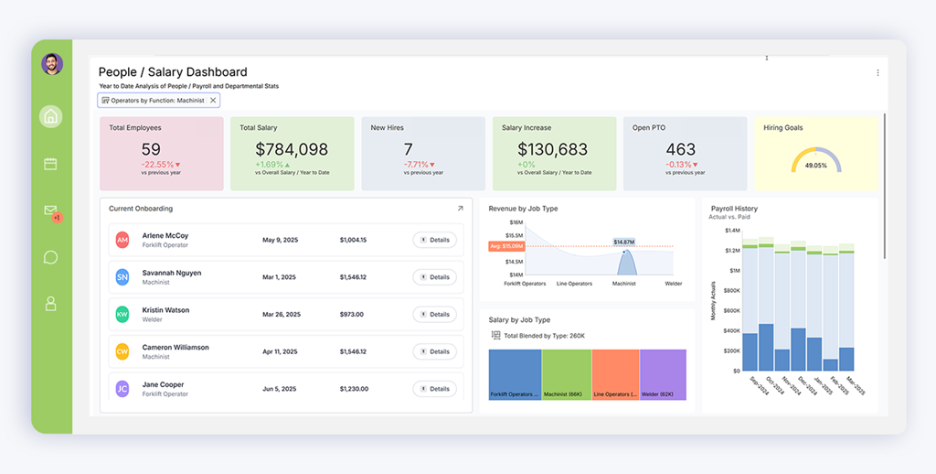
Reveal helps teams strengthen adoption in several key ways:
- Simple, readable dashboards
Users understand the view faster and gain insight with less effort.
- Self-service interactions
Reveal’s filters, sorting, and guided exploration help non-technical users work without support.
- A fully branded experience
Reveal blends into the product interface, creating a unified experience that supports trust.
- Faster delivery cycles
Reveal reduces build time and helps teams reduce time-to-market when adding analytics to their product.
- Retention and expansion benefits
Clear insights help customers stay engaged and support customer retention with embedded analytics.
- New revenue opportunities
Reveal supports paths for data monetization and higher product analytics revenue.


